Stockity Verification Guide 2026: How to Complete KYC Step by Step

Verifying your Stockity account may be required to confirm your identity, validate a payment method, or complete certain withdrawals. The verification process is simple, secure, and designed to confirm your identity before you can make unrestricted withdrawals.
In this guide, you’ll learn when Stockity may request verification, what documents could be required and how to avoid common submission problems

How to Verify Your Stockity Account — Complete KYC Guide for Traders
Verifying your Stockity account is one of the most important steps you can take after registration. It unlocks full withdrawal access, increases your transaction limits, and helps reduce the risk of unauthorized account use and payment fraud. This guide walks you through everything you need to know about the verification process from start to finish.
Why Does Stockity Require Verification?
Account verification — commonly known as KYC (Know Your Customer) — is a standard compliance requirement. Financial platforms commonly use KYC and AML checks to meet applicable identity-verification and anti-fraud obligations; this is not unique to Stockity, though specific requirements can vary by jurisdiction and product.
For traders, completing verification serves several important purposes:
- Protects your account from unauthorized access and fraudulent activity
- Verification may be requested before or during a withdrawal.
- Verification may be required before certain transaction limits or withdrawal functions become available
- Confirms ownership of the payment methods linked to your account
- Complies with international financial regulations that protect both the platform and its users
Skipping verification might seem convenient in the short term, but it will create delays and complications the moment you want to withdraw your earnings. Completing it early is always the smarter choice.
Who Needs to Verify Their Stockity Account?
Verification is required for:
- Traders making their first withdrawal from the platform
- Users withdrawing above a certain threshold amount
- Accounts flagged for additional security review
- Traders who want access to higher deposit and withdrawal limits
Even if verification is not immediately required for your current activity, completing it proactively saves you time and frustration later when you are ready to access your funds.
Key Facts About Stockity Verification
| Detail | Information |
|---|---|
| Verification Type | KYC (Know Your Customer) |
| Verification Fee | No fee is charged by Stockity for standard verification. |
| Processing Time | Verification time varies. Clear documents may be reviewed faster, while additional checks can extend the process. |
| Required For | Certain withdrawals and higher account limits |
| Can I Trade Without Verifying | Yes — but verification may be requested before or during a withdrawal. |
| Where to Submit | Through your Profile section |
Documents Stockity May Request
Depending on the verification request, Stockity may ask for one or more of the following types of documents:
Proof of Identity
A government-issued document that confirms who you are. Accepted documents include:
- Passport — the most universally accepted form of identification
- National Identity Card — front and back copy required
- Driver’s License — front and back copy required
Your document must be:
- Currently valid and not expired
- Clearly readable with no blurring, shadows, or cropped edges
- Showing your full name, date of birth, and photo
- Unedited and unaltered in any way
Proof of Address
A document confirming your current residential address. Accepted documents include:
- Utility bill — electricity, water, gas, or internet
- Bank statement — showing your name and address
- Government-issued letter — tax document or official correspondence
Your proof of address must be:
- Dated within the last three months
- Showing your full name and current address
- Issued by a recognized and legitimate institution
Proof of Payment Method (If Applicable)
If you deposited using a bank card, you may be asked to verify ownership of that card by providing:
- A photo of the front of the card showing the first six and last four digits — the middle digits can be covered for security
- A photo of the back of the card with the CVV fully covered
How to Verify Your Stockity Account — Step-by-Step Guide
Step 1 — Log In to Your Stockity Account
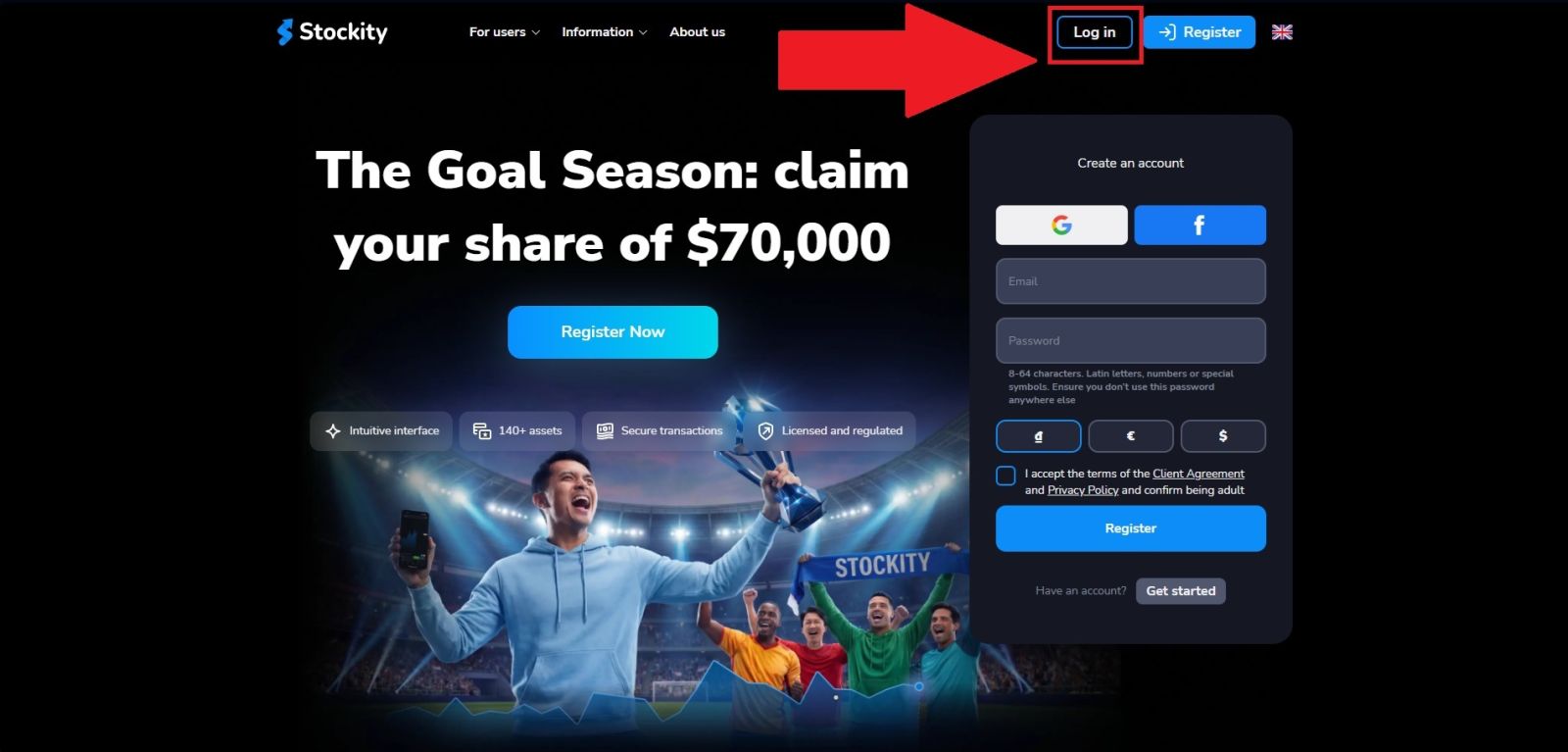
Launch your preferred web browser and visit the official Stockity website. Before signing in, make sure the website address is correct and check for the padlock symbol next to the URL, indicating that the connection is secure.
After verifying the site, click the "Log in" button on the homepage to open the account login page.
Step 2 — Navigate to Your Profile Section
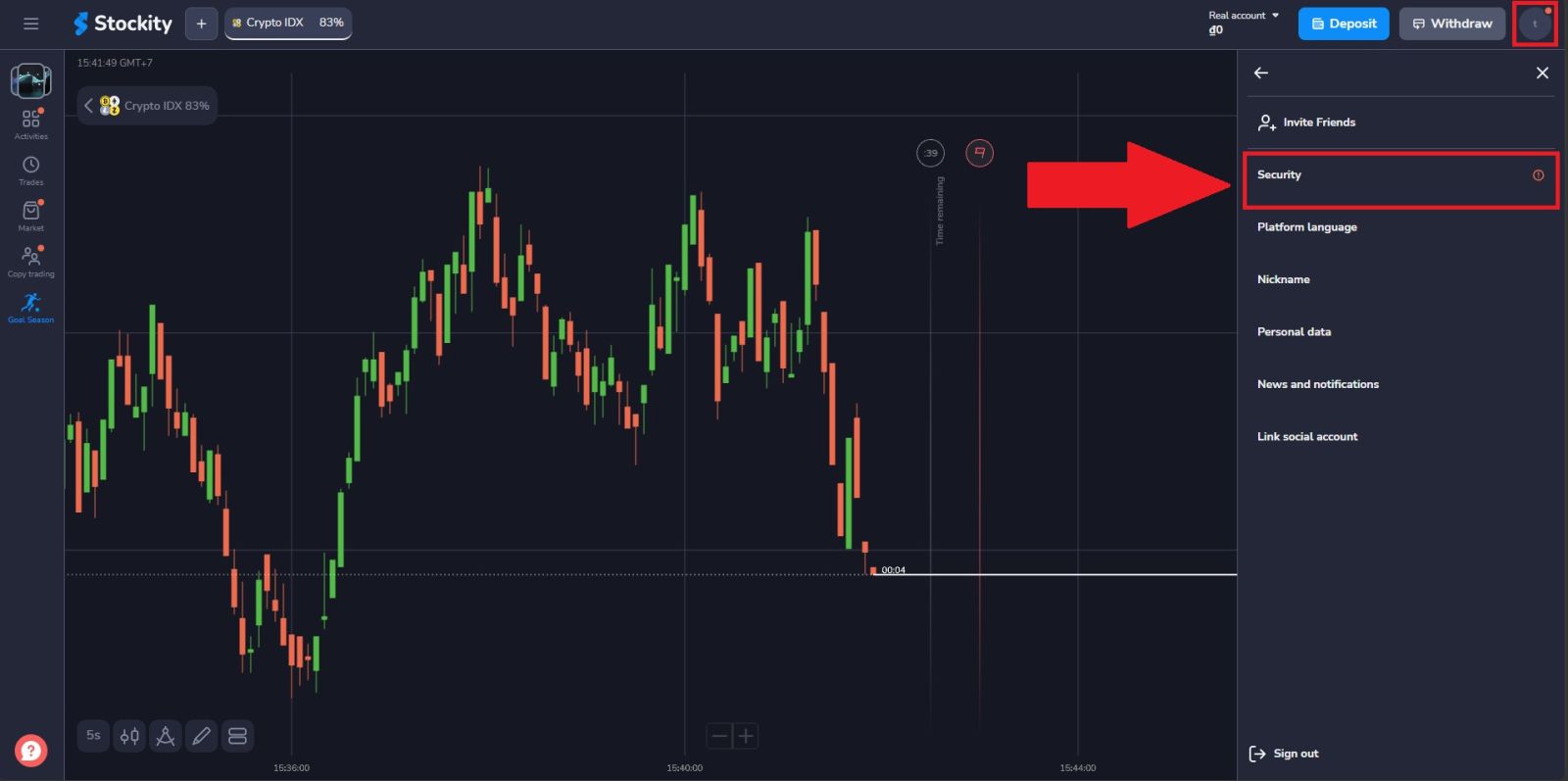
From your trading dashboard, locate and click the "Profile" button in the left navigation menu and select [Security]. This opens your personal account page where all your information and account settings are managed.
Step 3 — Confirm your Phone Number
On the verification page, locate the phone number section and enter your registered mobile number if you have not already done so. Once entered, click "Confirm" to complete the verification.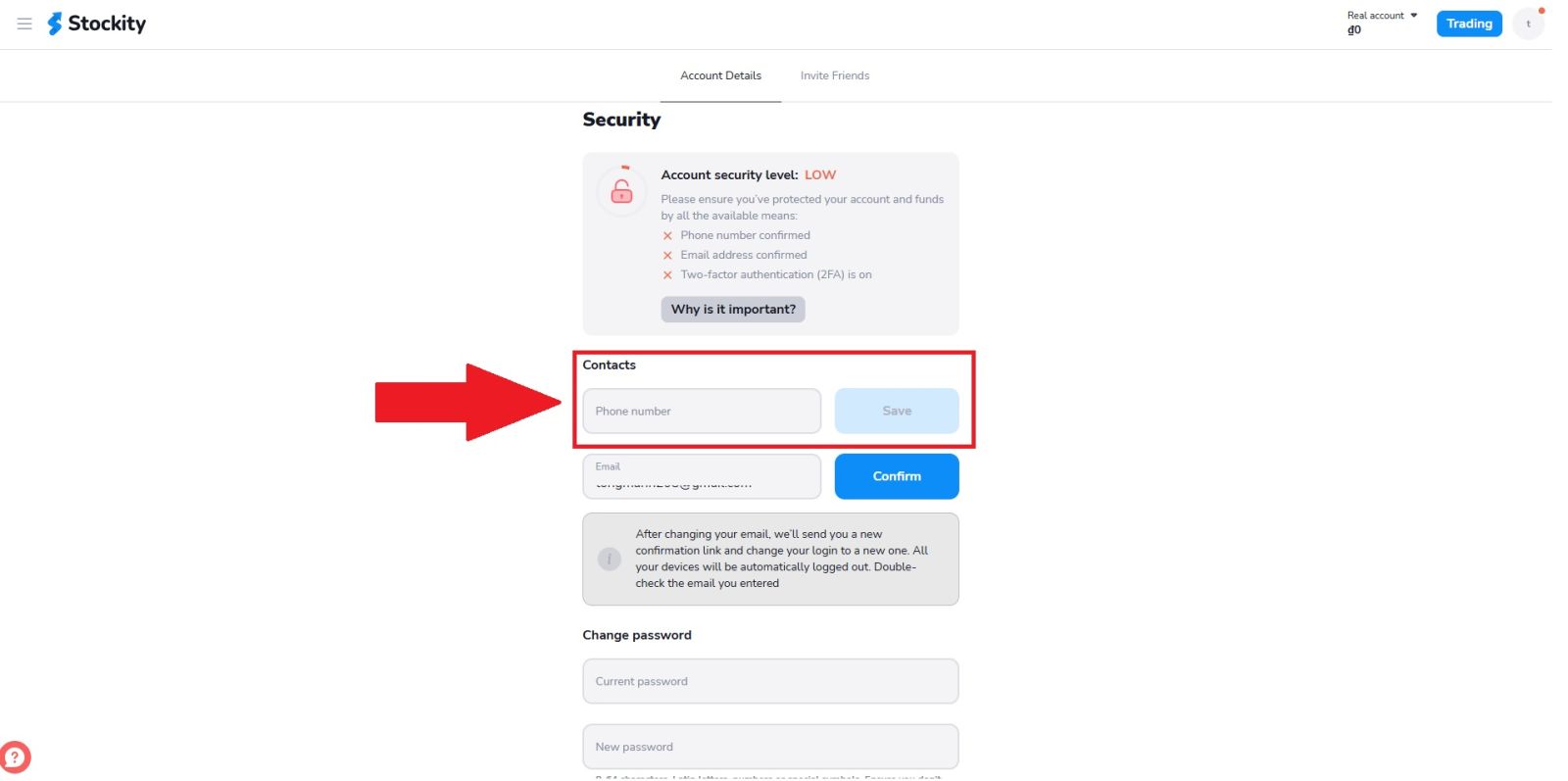
Step 4 — Verify your Email Address
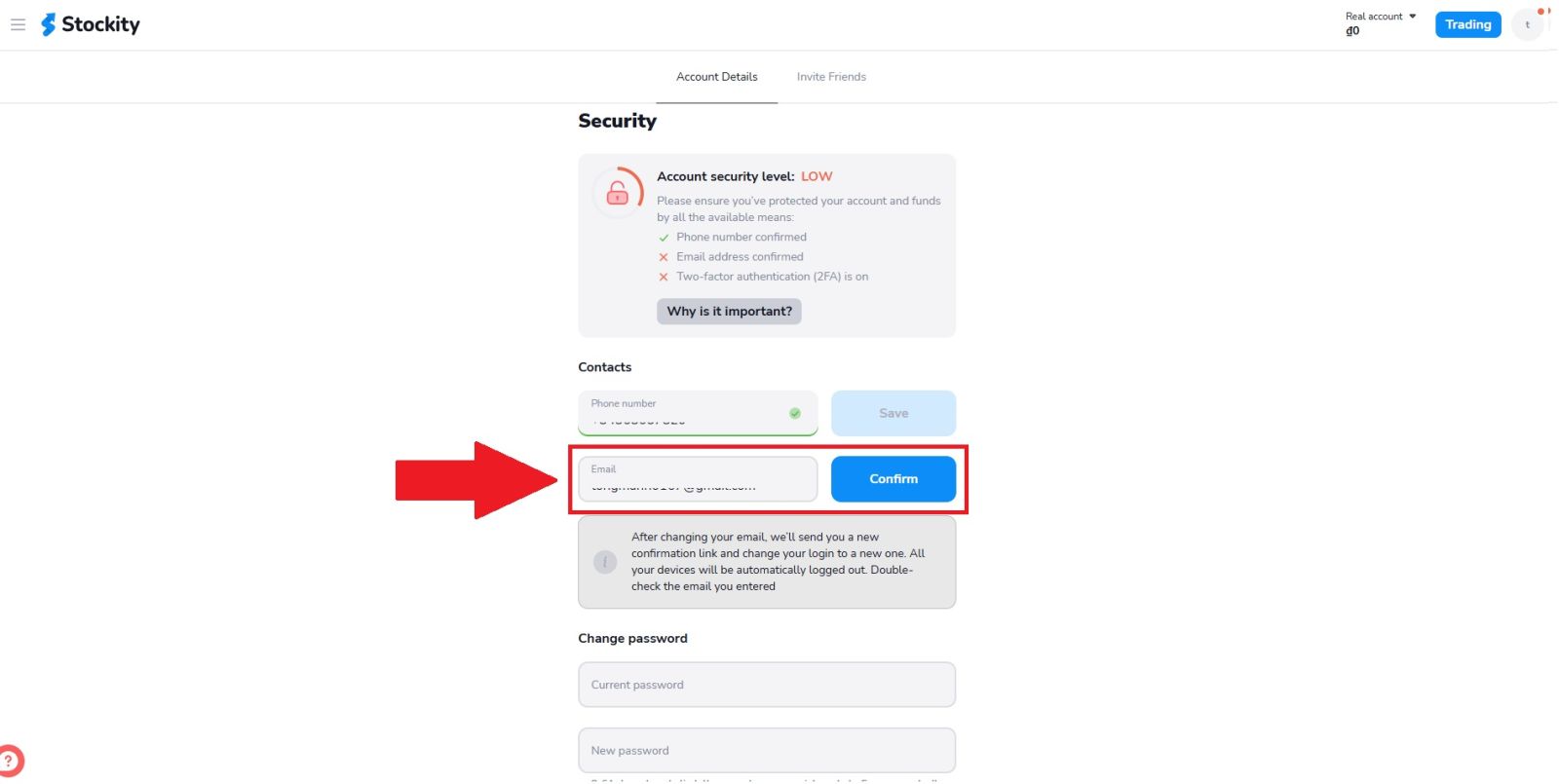
Next, locate the email confirmation section on the verification page. If your email address has not yet been verified, enter your email address, then click "Confirm" to receive a verification link sent directly to your registered inbox.Open the email from Stockity, click the confirmation link inside, and return to the verification page to continue. A confirmed email address is required before proceeding further with the verification process.
Step 5 — Complete your Personal Details
Before submitting verification documents, ensure your profile information is fully and accurately filled in. Scroll down to edit your personal details and complete all required fields:
- First and last name — must match exactly as they appear on your official ID.
- Gender — Select your gender identity.
- Date of birth — double-check the format before saving.
Congratulations — your Stockity account is now fully verified and ready for unrestricted trading and withdrawing.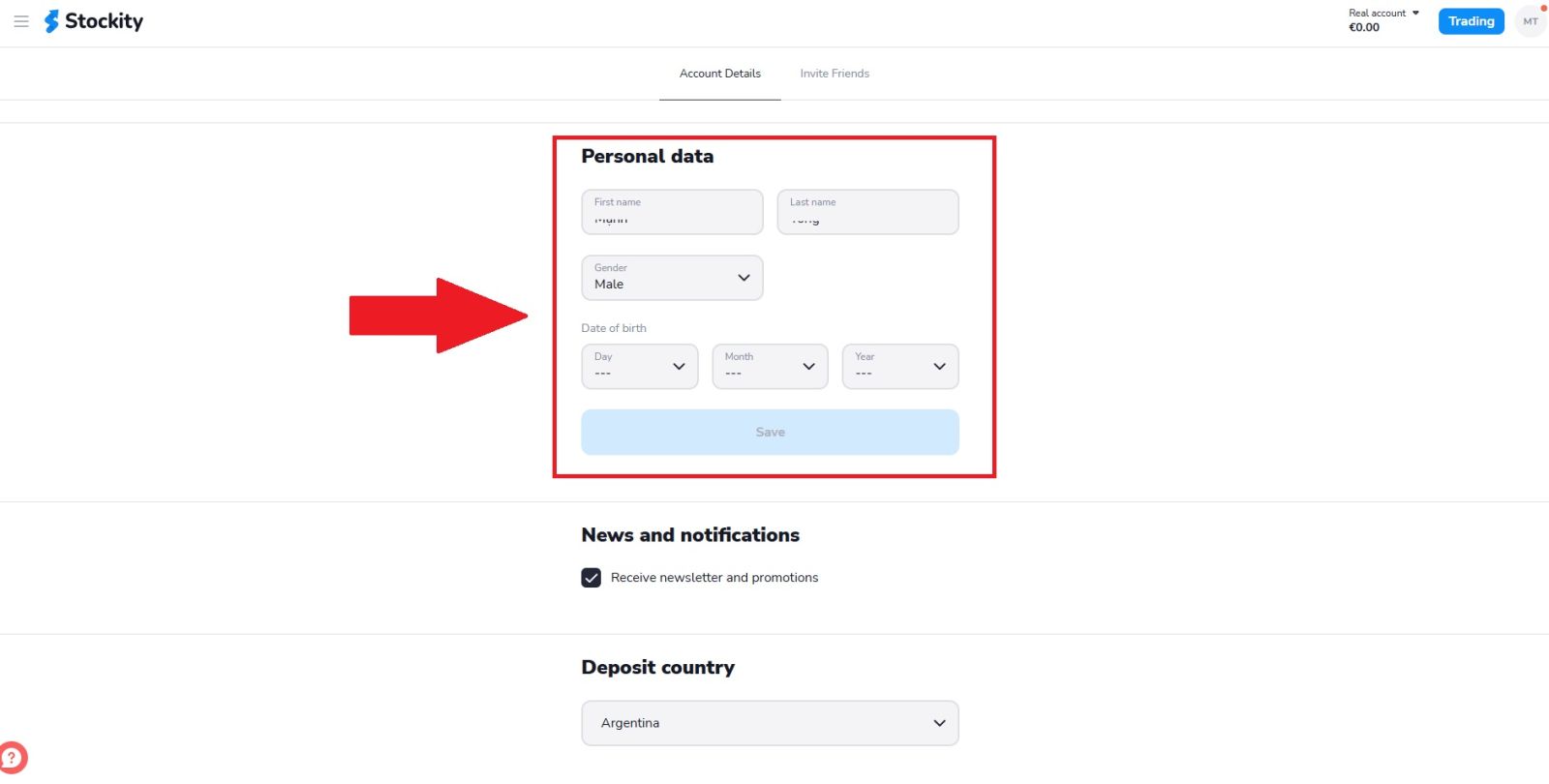
Step 6 — Submit Identity, Address, or Payment Documents (If Requested)
If Stockity requests further verification, an upload option for proof of identity, proof of address, and/or proof of payment method will appear in your account. Follow the on-screen instructions to upload clear copies of the requested documents, then wait for the review result — this is a separate step from confirming your phone, email, and personal details above.Completing these profile fields does not necessarily mean that full KYC has been approved. If Stockity requests identity, address, or payment verification, follow the document-upload instructions displayed in your account and wait for the review result.
Tips for Getting Verified Quickly
The speed of your verification approval comes down almost entirely to the quality of your submission. Keep these tips in mind before uploading anything:
Make sure your details match exactly
The name and address on your submitted documents must match precisely what you provided during registration. Even a minor discrepancy — a nickname instead of a full legal name, or a slightly different address format — can trigger a rejection.
Check document validity and dates
An expired ID or a proof of address older than three months will not be accepted. Confirm both before submitting. Most banks and utility providers allow you to download recent statements directly from their online portals.
Submit early — do not wait
Complete verification when the option is available in your account, or as soon as Stockity requests it. Acting promptly can help you avoid delays when you want to withdraw.
Monitor your email closely
If there is an issue with your submitted documents, Stockity will reach out via your registered email. Check your inbox regularly during the review period and do not forget to look in your spam folder.
Common Verification Problems and How to Fix Them
Name or address mismatch
If the details on your documents do not align with your account registration information, update your profile details first or contact Stockity support for guidance on how to proceed before resubmitting.
Verification taking longer than expected
If the review takes longer than the estimated period shown in your account, contact Stockity customer support through the live chat feature on the platform. Have your submission reference details ready to help the team locate your case quickly.
Conclusion: Verify Your Stockity Account for Secure and Unrestricted Trading
Completing your Stockity account verification is an important step in protecting your account and meeting the platform’s KYC requirements.To help the process go smoothly: Make sure your profile details match your official documents exactly - Only upload identity, address, or payment documents when Stockity specifically requests them, and only through the secure upload option inside your account - Review times can vary, so check your account status or registered email for updates.
Keep in mind that completing your profile and confirming your phone/email is not the same as full KYC approval, and some limits or restrictions may still apply depending on your account.